Virtual Try-On Setup and Execution。
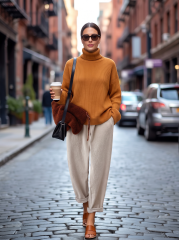
Reference image 1 is your primary model photograph. Preserve the model's facial features, hairstyle, skin tone, body proportions, posture, camera angle, composition, and overall atmosphere. Reference image 2 contains the garment to apply. Identify and accurately render its style, color, material, cut, pattern, tailoring, and design details, while ignoring the model, pose, background, text, product information, or layout in that reference. Create a realistic virtual try-on image by dressing the model from image 1 in the clothing from image 2. The result should be a complete, coherent, authentic fitting photograph. The garment must fit naturally to the body, be worn correctly, and display realistic fabric draping, weight, containment, and overlap. Prioritize the model and setting from image 1—replace only the clothing. For tops, replace the upper garment while keeping or intelligently coordinating the lower wear. For bottoms, replace the lower garment while keeping or intelligently coordinating the top. For dresses, suits, coats, or full ensembles, replace the entire outfit. The final effect should look like a professional model try-on: the subject natural, the garment clear and complete, unobstructed by hair, arms, or props. Achieve a clean, photorealistic, premium appearance with correct body proportions, clear garment details, unified lighting, and seamless fitting. Do not alter the model's identity, change facial features, modify the hairstyle, dramatically shift the pose, add extra figures, create incorrect garment construction, change colors, replace patterns, add unnecessary decoration, render flat lay or hanger shots or product pages or grid layouts, include text, logos, labels, or non-Latin characters, distort limbs, create hand errors, cause garment clipping, reduce clarity, disrupt background coherence, or leave the try-on incomplete.